
How to Know If Your Car Has ADAS Features and Sensors
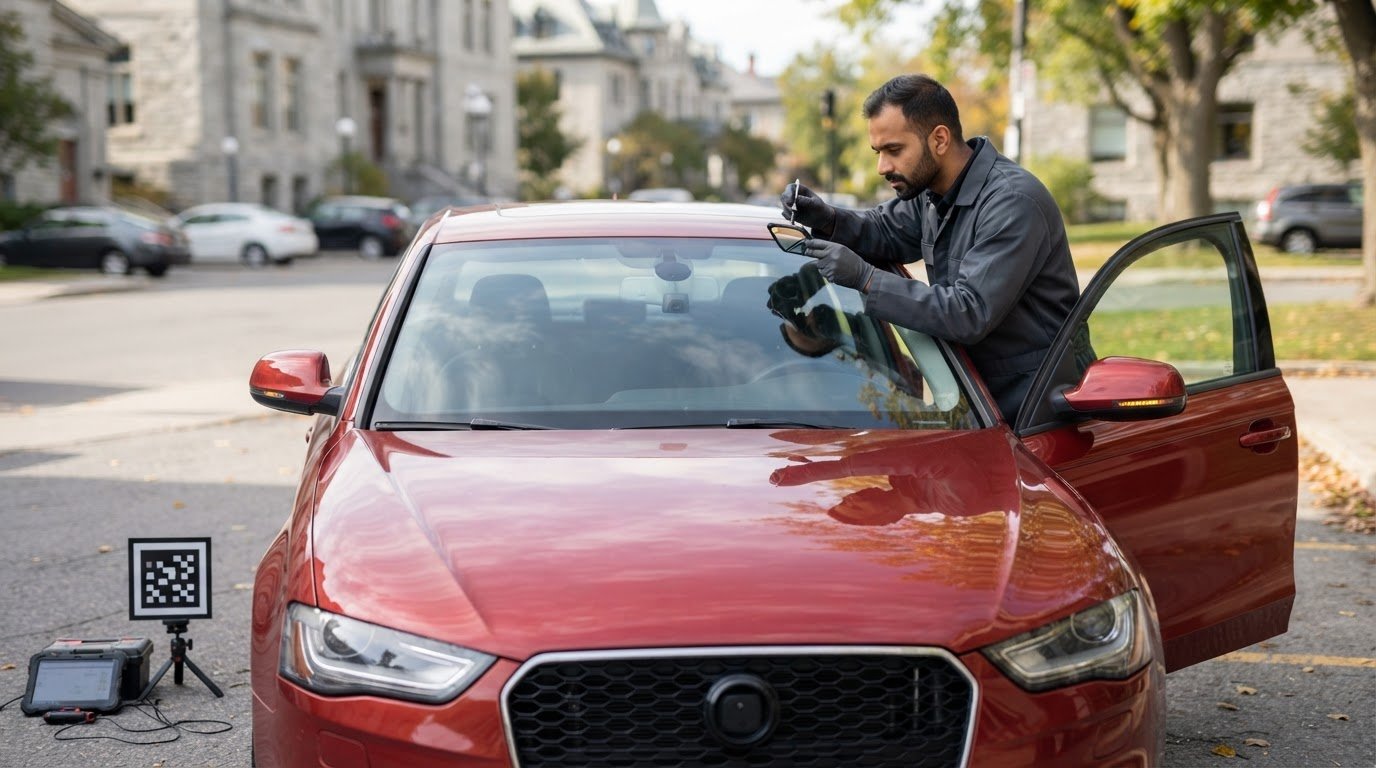
The clearest ADAS clue may be sitting just above your rearview mirror. A camera mounted inside the windshield is commonly used for driver-assistance features, while mirror indicators, front sensors and dashboard or settings-menu options can reveal others. If you’re wondering how to know if my car has ADAS, start by checking these areas and your owner’s manual.
It’s easy to overlook these features or mistake a warning light for an ordinary dashboard symbol. ADAS can include blind-spot monitoring, adaptive cruise control, lane departure warning, and collision avoidance, but the equipment and controls vary by vehicle.
This guide explains how to check the windshield camera, front radar, blind-spot indicators, vehicle settings, and manual. You’ll also learn what a warning light can tell you and why windshield replacement may require camera recalibration. These checks can help identify the systems fitted to your car and show you what to look for next.
Key Takeaways
- Look for warning indicators built into the side mirrors to spot possible blind-spot monitoring.
- Use your vehicle’s settings and owner’s manual to identify available driver-assistance features and controls.
- Check the grille and lower front bumper for sensors, and look behind the rearview mirror for a windshield-mounted camera.
- If windshield damage or replacement affects a camera’s area, ask about ADAS camera recalibration to help maintain proper sensor alignment.
Identifying blind-spot monitoring indicators
Start by checking the side mirrors, dashboard, and camera locations for possible ADAS equipment. Then compare what you find with your vehicle’s records and settings.
-
Check the side mirrors for blind-spot indicators
Look for a small warning symbol or light built into each side mirror. Some systems briefly illuminate these lights during the ignition self-check. While driving, a light may flash or stay on when another vehicle enters your blind spot. Treat the indicators as clues, then check the settings or owner’s manual for a feature called blind-spot monitoring.
-
Look for surround-view cameras
Check underneath the side mirrors, near the front grille, and around the rear bumper for small camera lenses. Cars with surround-view cameras often show a combined view when shifted into reverse. A rear camera alone doesn’t mean the vehicle has a full surround-view system. Check the display and manual for a top-down or multi-camera view that includes more than the rear area.
-
Confirm features with a mechanic or dealership
A mechanic or dealership can identify the ADAS equipment fitted to your exact vehicle. Provide the make, model, model year, and trim, and ask them to compare the VIN or build sheet with the equipment installed. A VIN or build sheet can help identify factory equipment, but may not show later changes. Ask for confirmation of the features actually present, not just a general list for that model.
-
Avoid relying on a sensor or symbol alone
Compare visible sensors and dashboard symbols with the owner’s manual and settings. ADAS features in Canadian cars vary by model year and trim, so don’t assume every vehicle has the same systems. A sensor may serve another purpose, and a symbol may indicate a setting or warning rather than an active feature. Confirm the feature’s name and operation before relying on it while driving.
Using vehicle settings and the owner’s manual to check ADAS
Use your vehicle’s settings and manual to match dashboard controls with named features. Check the exact model year and trim, as equipment can differ between versions.
- While parked, open the driver-assistance settings. Look for labels such as lane departure warning, lane-keeping assistance, adaptive cruise control, collision avoidance, or blind-spot monitoring. Some vehicles let you adjust a feature’s sensitivity or switch it off, so an inactive setting doesn’t necessarily mean the equipment isn’t installed.
- Find the relevant section in your owner’s manual. Search the index for each dashboard symbol or feature name, then compare the instructions with the steering-wheel buttons and menu options in your car. Controls for adaptive cruise control or lane-keeping assistance can also suggest that the vehicle has a windshield camera.
- Check the manufacturer’s Canadian website for the correct model year and trim. Model pages, brochures, and equipment lists can help identify available features; compare them with your vehicle’s build details. To find ADAS features by model and trim, start with the manufacturer’s Canadian model-year information, then use the owner’s manual or build sheet to match listed equipment to your specific vehicle.
- Don’t rule out ADAS just because your car has a manual transmission. A manual car can still have driver-assistance features; the transmission alone doesn’t identify its safety equipment. Use the settings and manual to confirm which systems are fitted, and note any features listed as unavailable for your trim.
- Watch the instrument cluster during startup, then check for warning messages while parked. How can you check whether ADAS is working and which lights should you look for? Compare any persistent ADAS, lane, or collision-warning symbol with the manual, which explains its meaning. A car may require ADAS calibration if its ADAS dashboard warning light is on. If a windshield camera warning remains, arrange an ADAS camera recalibration.

Checking for front radar and adaptive cruise control
Front radar and cruise-control settings can offer useful clues. To find out whether your car has ADAS, compare visible equipment with the controls and indicators inside your vehicle.
- Inspect the grille while the vehicle is parked. Front radar may sit behind a small area integrated into the grille. Look for a distinct sensor panel, but don’t assume every grille feature is radar. Note its location and compare it with diagrams or equipment descriptions in the vehicle manual.
- Check the lower front bumper for additional sensors. Some cars have multiple front sensors, including radar sensors or cameras positioned low on the bumper. Look across the front, not just at the grille. Note any visible devices, then compare their locations with your vehicle’s equipment information.
- Turn on the vehicle and check the instrument cluster for labels such as “radar cruise control” or “adaptive cruise control.” These indicators can point to front radar-based assistance. Review the steering-wheel controls and manual together. A general cruise-control button alone doesn’t mean adaptive cruise control is fitted.
- Open the settings menu and look for adaptive cruise control, lane departure warning, or collision avoidance. These options can help identify available features. The best way to find out whether your car has ADAS is to match a named setting with the relevant controls and equipment information, rather than relying on a sensor’s appearance.
- Compare several clues before deciding what your car has. For example, a grille sensor, an adaptive-cruise setting, and a matching cluster indicator together give a clearer picture than any one clue. Check the manual for the feature’s exact name and instructions. This can also help distinguish adaptive cruise control from standard cruise control.
Locating windshield-mounted ADAS cameras
Look inside the vehicle, near the rearview mirror, for a camera housing. Its position can point to driver-assistance equipment and help explain why windshield work may affect sensor alignment.
- Park safely and inspect the inside of the windshield behind the rearview mirror. An ADAS camera is commonly mounted there, often in a plastic housing attached to the glass. Look from both outside and inside; the housing can blend into the mirror mount and may not look like a camera lens.
- Check the housing for a visible lens or small viewing area. Avoid touching, covering, or removing it. The camera needs a clear view through the windshield, and its position is a useful clue, not proof by itself. Match what you see with the driver-assistance features named in your vehicle settings or owner’s manual.
- Look for camera-related controls or messages in the instrument cluster. Lane departure warning and lane-keeping assistance are examples of features that may use a windshield camera. Compare the displayed feature names with the manual, then note any camera or driver-assistance warning that stays lit after startup.
- Check the windshield around the camera for cracks, chips, or signs of replacement. Damage near the camera’s viewing area can obstruct its view. A car may need ADAS calibration after windshield replacement, so tell the glass technician if a camera is mounted behind the mirror. Calibration checks and adjusts the camera’s alignment so it can read the road correctly.
- Arrange an ADAS camera recalibration if a warning remains, the camera’s alignment may have changed, or the windshield has been replaced. A camera can look intact while its aim is off. Don’t rely on its appearance alone to judge function. If windshield damage or replacement affects your camera, book windshield camera recalibration to have its alignment checked.
Auto Glass Ottawa: Windshield Repair
Auto Glass Ottawa can help when windshield damage affects your view or is near an ADAS camera. Depending on the damage, Windshield Repair may address it, while Windshield Replacement is available when the glass needs replacing. Since the camera is mounted behind the windshield, tell the technician about any ADAS features or warning messages you’ve noticed.
Mobile Windshield Repair brings service to your home or workplace in Ottawa, so you don’t need to travel with damaged glass. If you’re making an insurance claim, Insurance Claim Assistance can help with the process. Have your vehicle’s make, model, and details about the damage ready when you get in touch.
Contact Auto Glass Ottawa to discuss your windshield damage and the next steps.
Make your next step a safety check
If you’re wondering, “how to know if my car has ADAS,” use what you’ve found to guide your next conversation about vehicle safety. Note any feature names, dashboard messages, or recent windshield work so you can share clear details if questions come up.
If a windshield concern has raised questions about your vehicle, get in touch to discuss your next step. A clear account of what you’ve noticed can help you move forward with confidence.
Frequently Asked Questions
What are some examples of ADAS?
Examples include rear cross-traffic alert, parking assistance, and traffic sign recognition. These features serve different purposes: one can warn about movement behind the vehicle, another can assist with parking, and another can display detected road signs. Equipment and feature names vary by vehicle and manufacturer, so check the wording in your vehicle’s documentation.
What does ADAS stand for?
ADAS stands for Advanced Driver Assistance Systems. “Assistance” is the key idea: these systems provide alerts or support specific driving tasks, but they don’t replace your attention or judgement. A warning or intervention can depend on the system’s operating conditions. Read your vehicle’s instructions to understand what each feature does and when it may not be available.
What features count as ADAS in a car?
A feature generally counts as ADAS if it uses vehicle technology to help with driving, detect a hazard, or alert the driver. Consider its purpose: does it assist with a driving task or provide a safety warning? Features designed only for comfort or entertainment don’t become ADAS simply because they use cameras or sensors.
How can I check my car’s owner’s manual or specifications for ADAS?
For the most useful comparison, make sure the documentation matches your vehicle’s model year, trim, and original market. Manufacturers may use different names for similar functions, so check the index under both the feature name and related terms such as “driver assistance” or “safety.” If you’re reviewing a used car, compare the paperwork with the vehicle you’re considering.
How do I identify ADAS features using dashboard buttons, symbols, or camera sensors?
Treat a dashboard symbol as a prompt to identify the related function, not as a diagnosis on its own. Symbols and messages vary by vehicle, and an indicator may signal a fault rather than confirm normal operation. Note the exact wording, then check the vehicle’s explanation to distinguish a feature control from a warning that needs attention.
How can I tell whether my car has adaptive cruise control, lane-keeping assist, or automatic emergency braking?
Drivers wondering how to know if their car has ADAS can look at what each feature does. Adaptive cruise control adjusts speed to help maintain distance from traffic ahead. Lane-keeping assist can support steering, while automatic emergency braking can apply the brakes in response to a detected collision risk. Check your vehicle’s instructions for each feature’s exact function and limits.